Practical Tools
Decision-grade tools for
compliance, sustainability & conformity assessment.
Alongside our advisory work, Glatow & Associates builds focused, practical tools for the calculations, evidence steps, workflows and questions our clients return to most often — from carbon and RED / EUDR compliance to conformity-assessment administration and secure, self-hosted AI. Each one is purpose-built, tightly scoped, and made to hold up where it matters: in front of an auditor, an accreditor, or your own team.

Glatow & Associates — Member of the NVIDIA Inception Program
Generic, do-everything software rarely survives real-world scrutiny. Our tools take the opposite approach: each one is built for a specific job — a calculation, a due-diligence step, an accreditation process, a daily workflow — and grounded in the actual rules, sources or documents behind it, with a clear, traceable basis you can stand behind.
Our Tools
Eight focused products in four areas — click any tool for the full detail.
Biofuels & feedstock
From the collection point to the biodiesel plant — traceability, mass balance, GHG and Proofs of Sustainability.
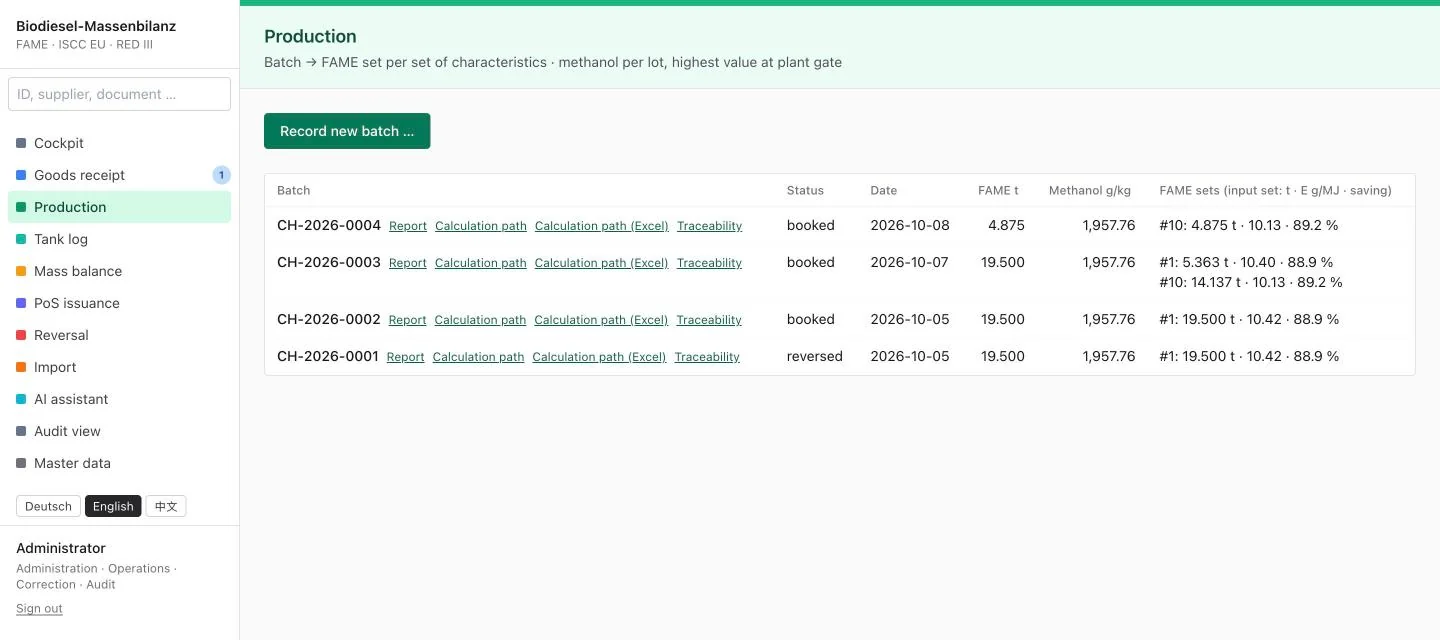
FeedstockTrace Biodiesel
Mass balance, per-batch GHG and Proof of Sustainability for biodiesel (FAME) plants — standalone, audit-ready.
View details →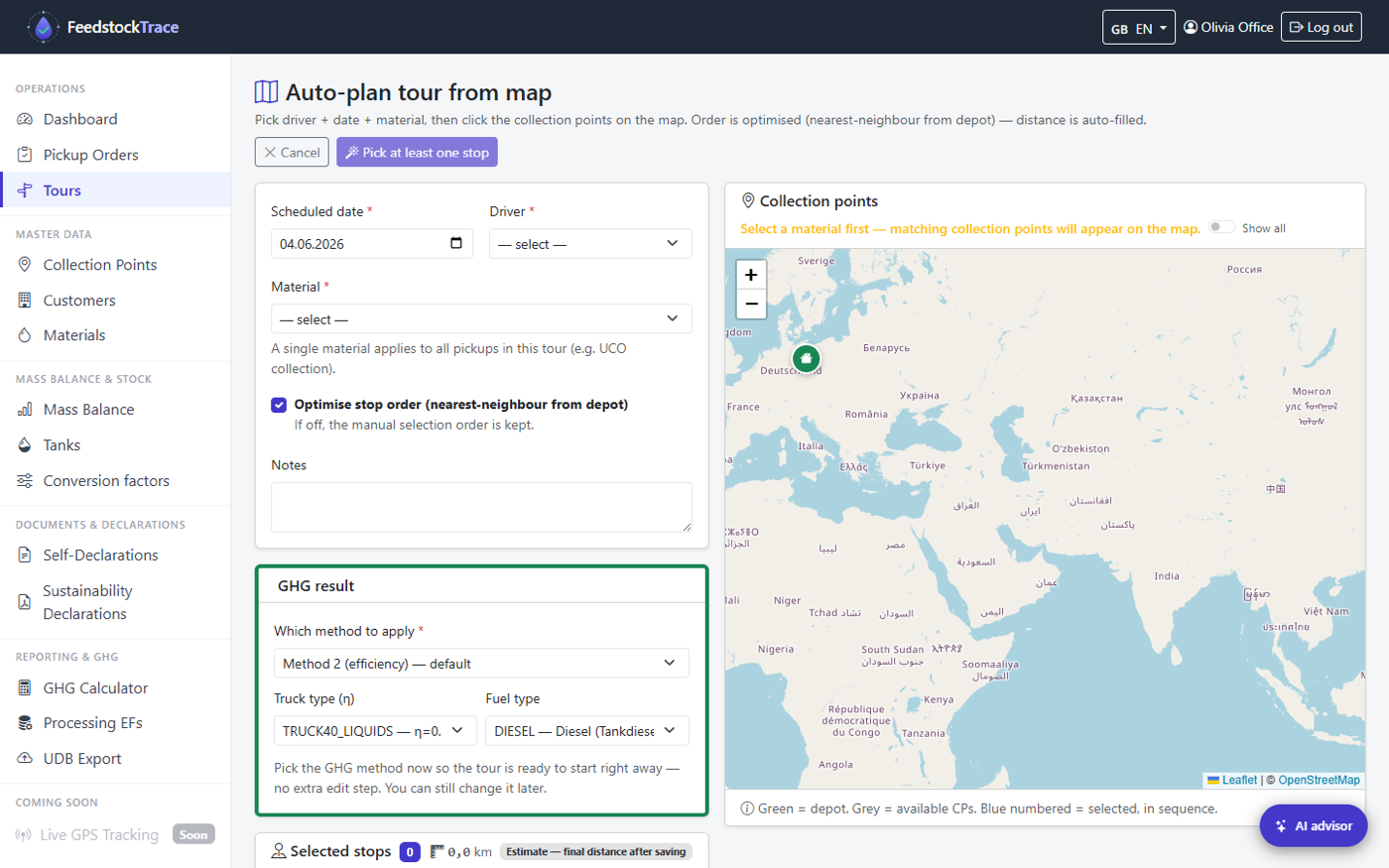
FeedstockTrace
RED III / ISCC-EU / EUDR traceability for waste & residue collection — from the photo at the collection point to the audit export
View details →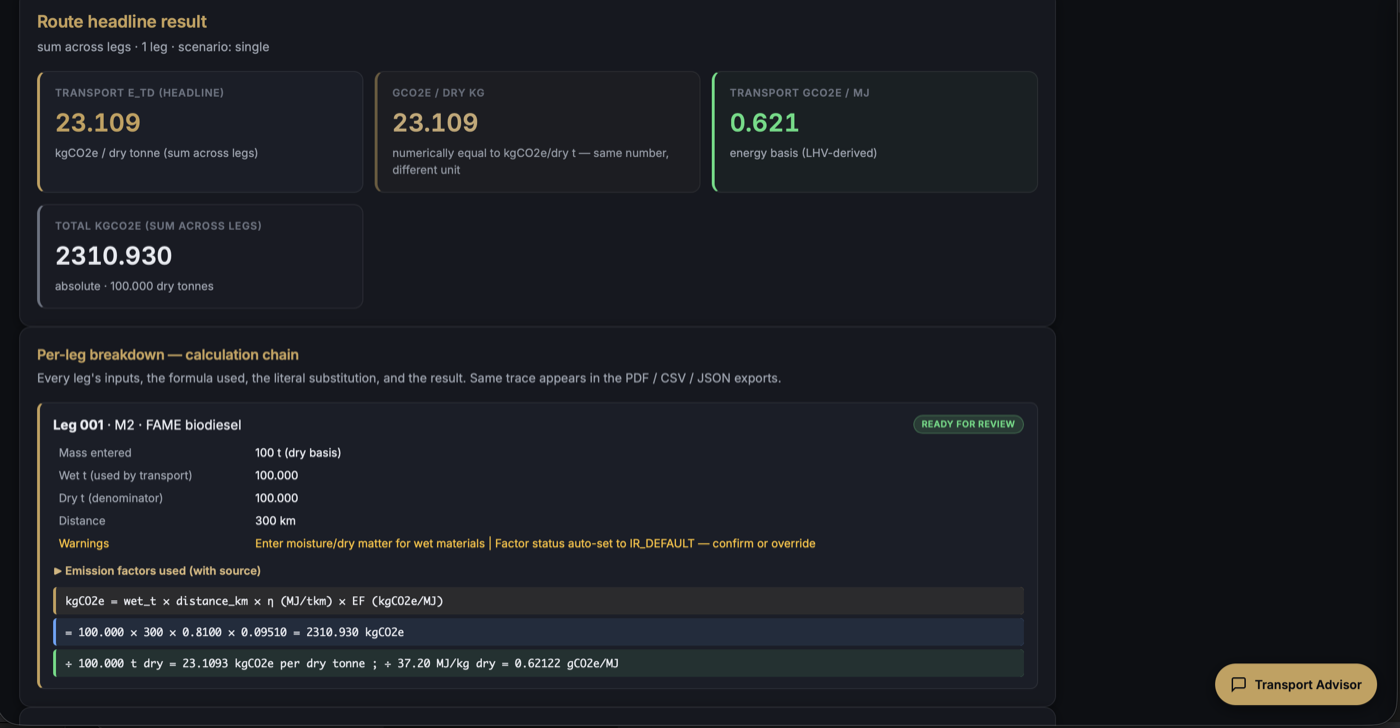
Transport etd Calculator + AI Advisor
ISCC EU / RED III — Transport & Distribution Emissions, with a built-in AI advisor.
View details →Land use & deforestation
Satellite evidence per plot — deforestation-free under EUDR and ISCC Principle 1.
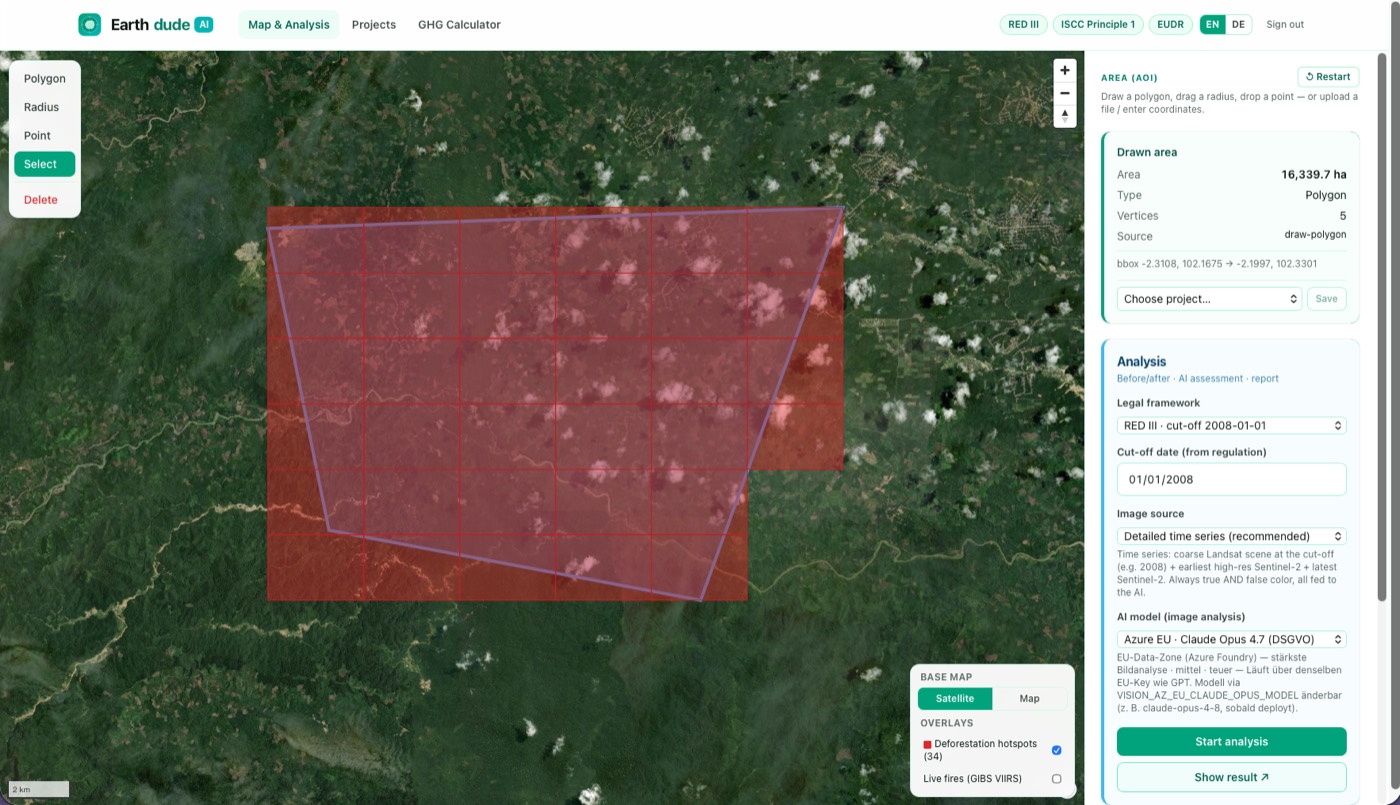
Earthdude AI
Satellite land-use analysis — deforestation & land-use change against the EUDR cut-off, per plot.
View details →Carbon & certification
GHG audits and the administration of certification and conformity-assessment bodies.
GHG Inventory
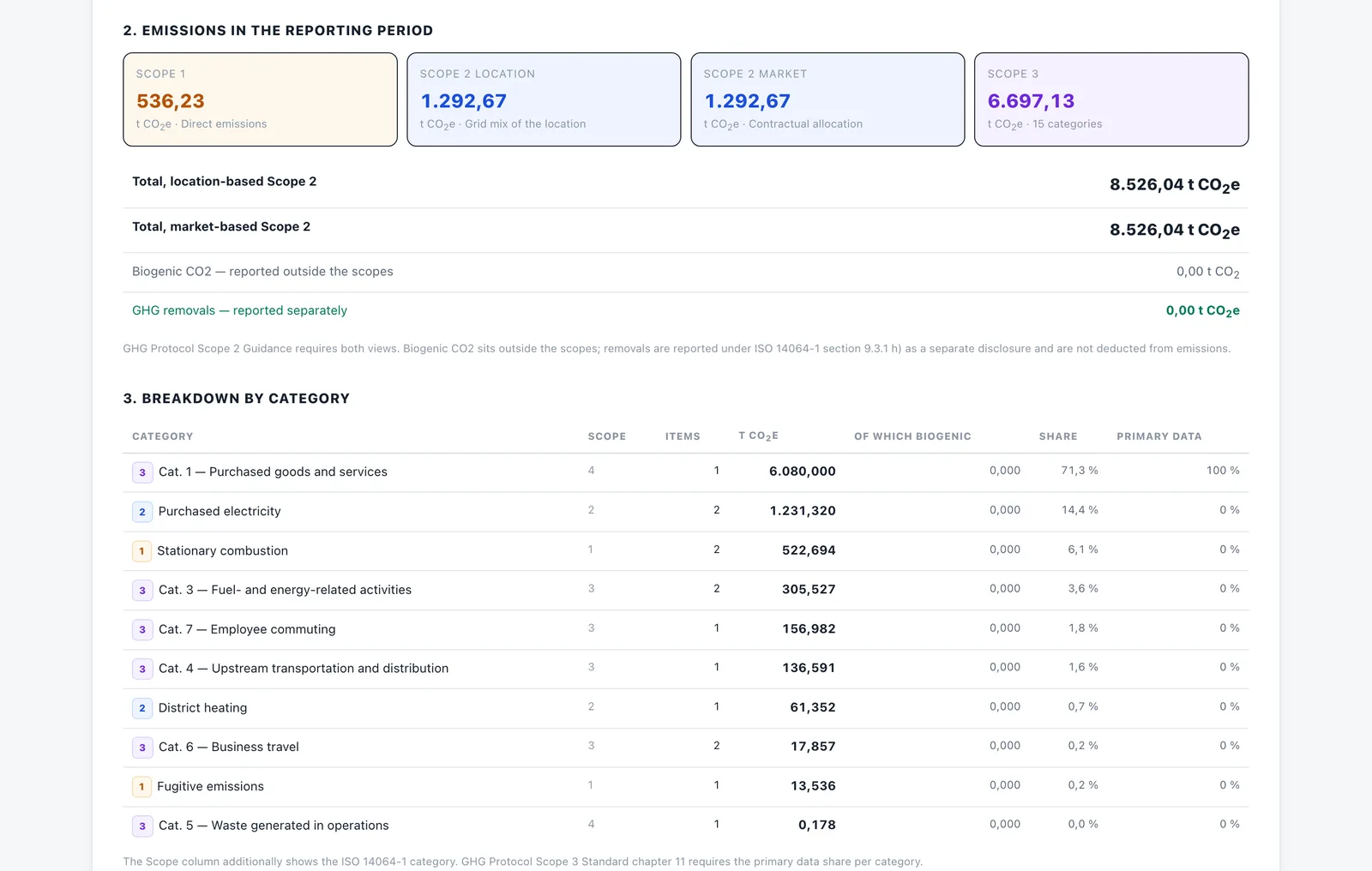
Corporate greenhouse gas inventory under the GHG Protocol and ISO 14064-1 — co-issued with TVA
View details →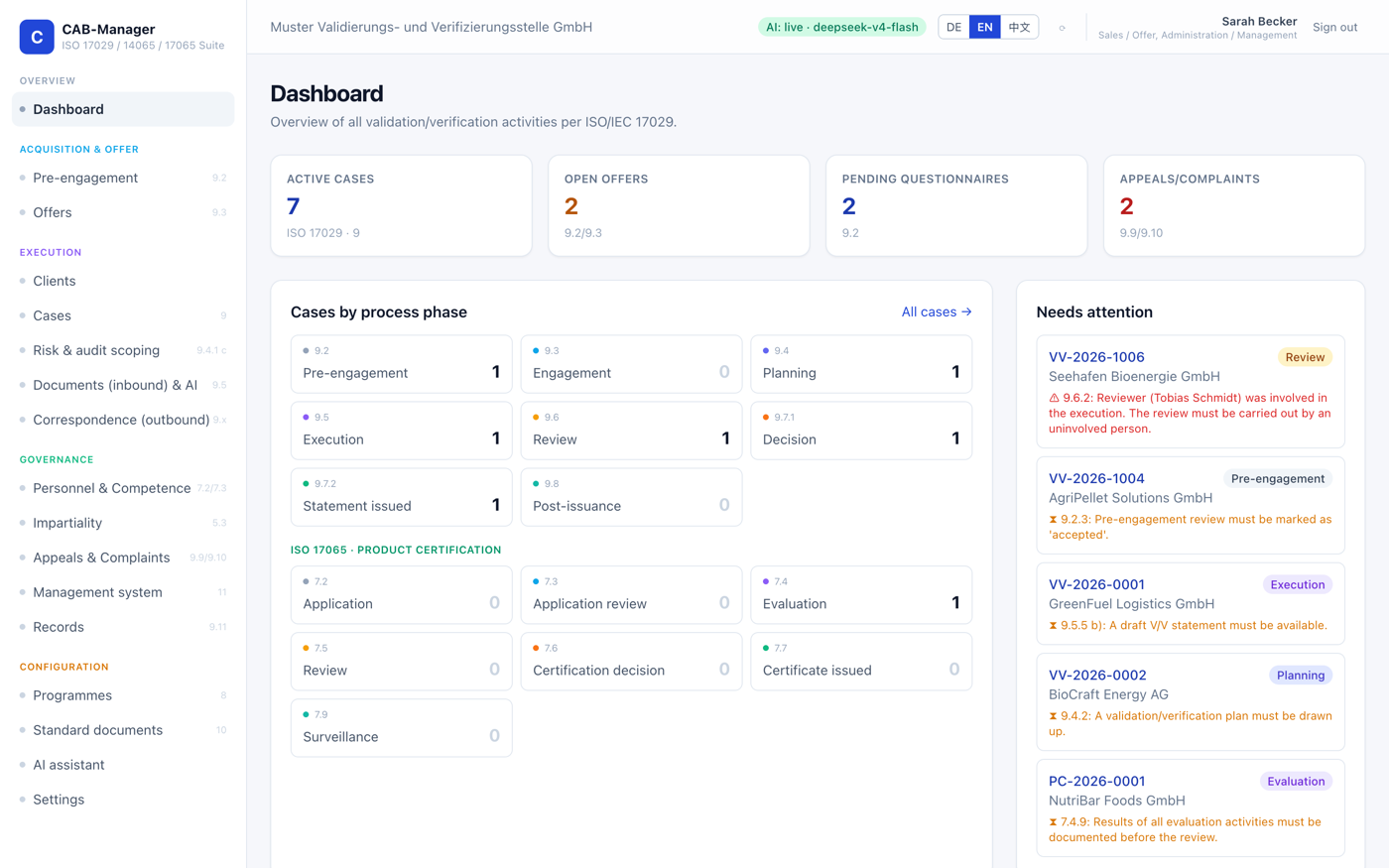
CAB-Manager
ISO/IEC 17029 & ISO 14065 administration suite for certification & conformity-assessment bodies (CBs / CABs)
View details →Secure AI for your business
Self-hosted AI that cites its sources — your data stays under your control.
G&A Secure AI
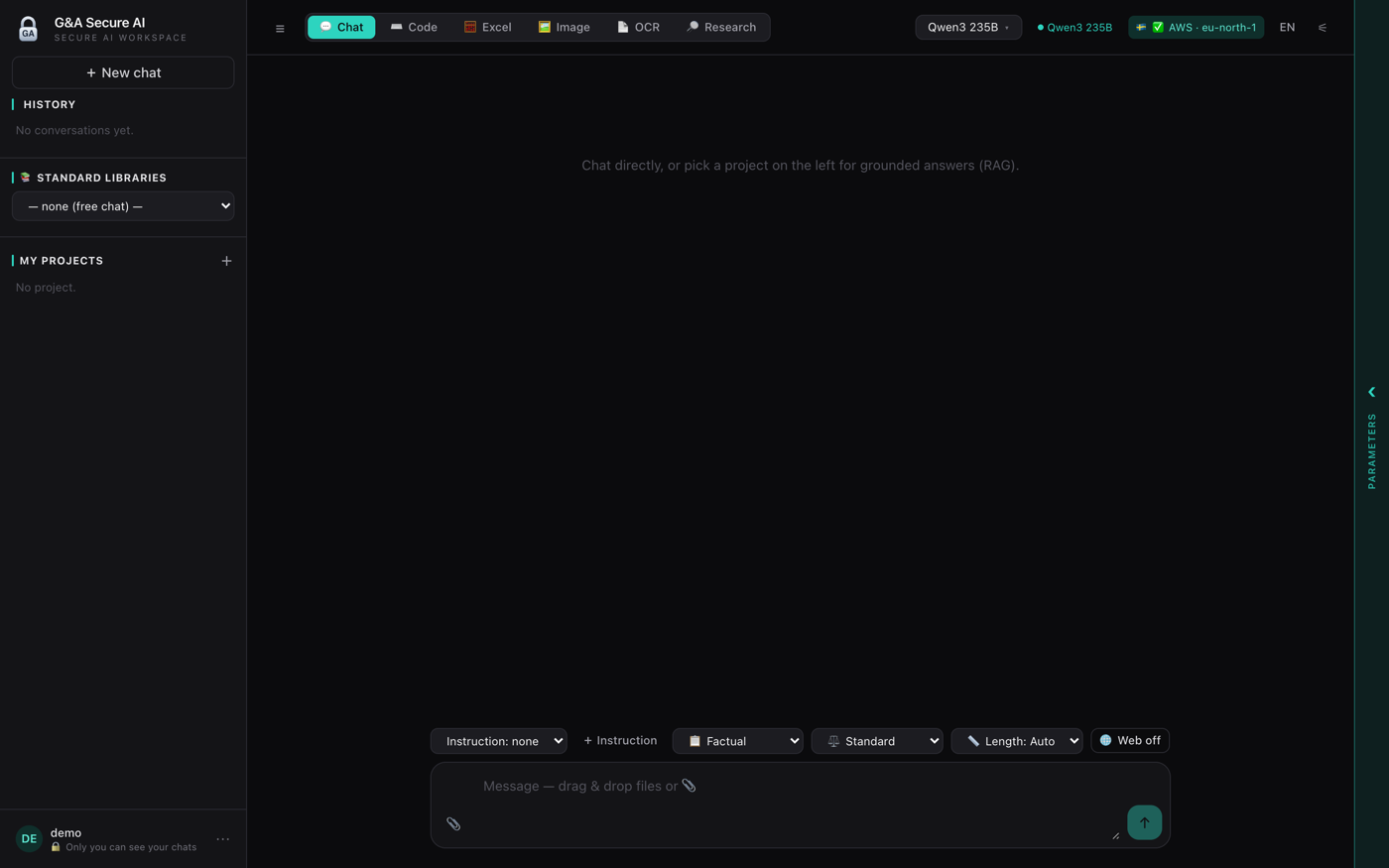
A private, self-hosted AI workspace — chat plus per-project knowledge, grounded and cited, with your data staying in-house
View details →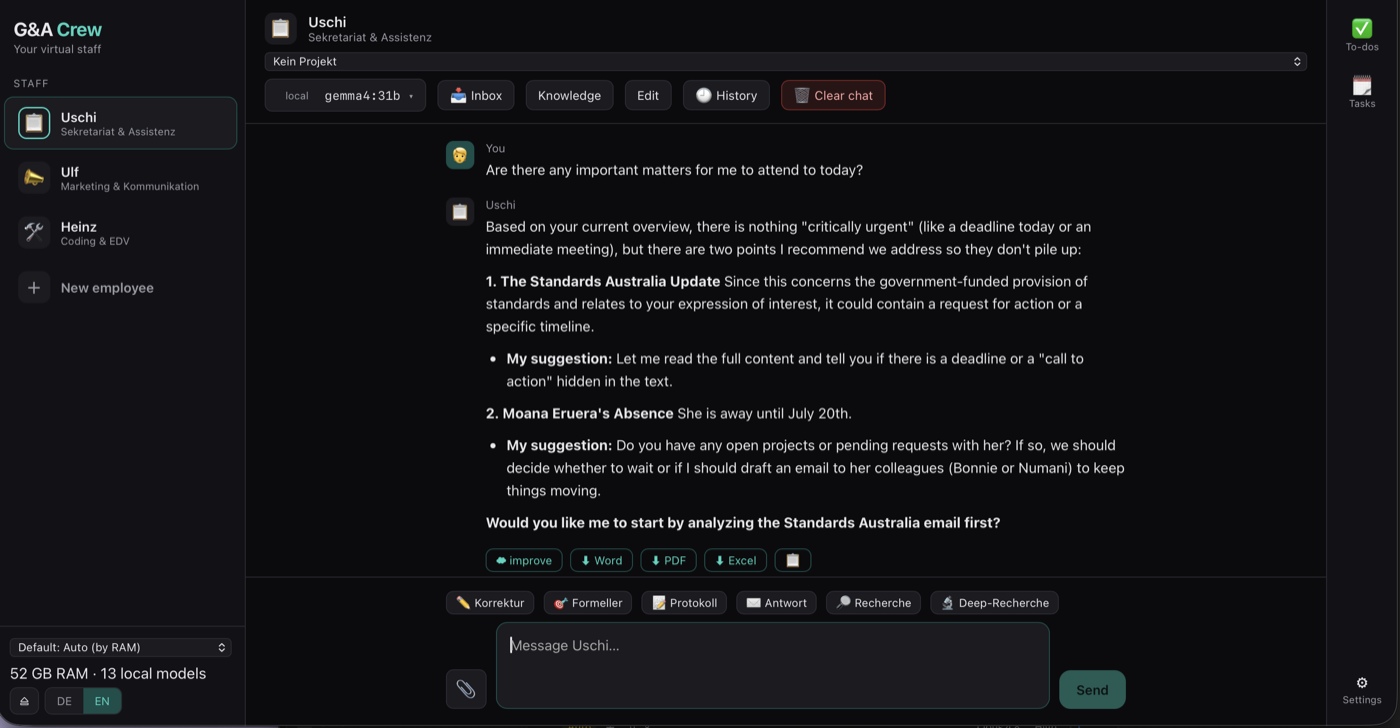
G&A Crew
Your virtual staff — named, self-hosted AI colleagues that draft, while you approve
View details →G&A Secure AI
A private, self-hosted AI workspace — chat plus per-project knowledge, grounded and cited, with your data staying in-house
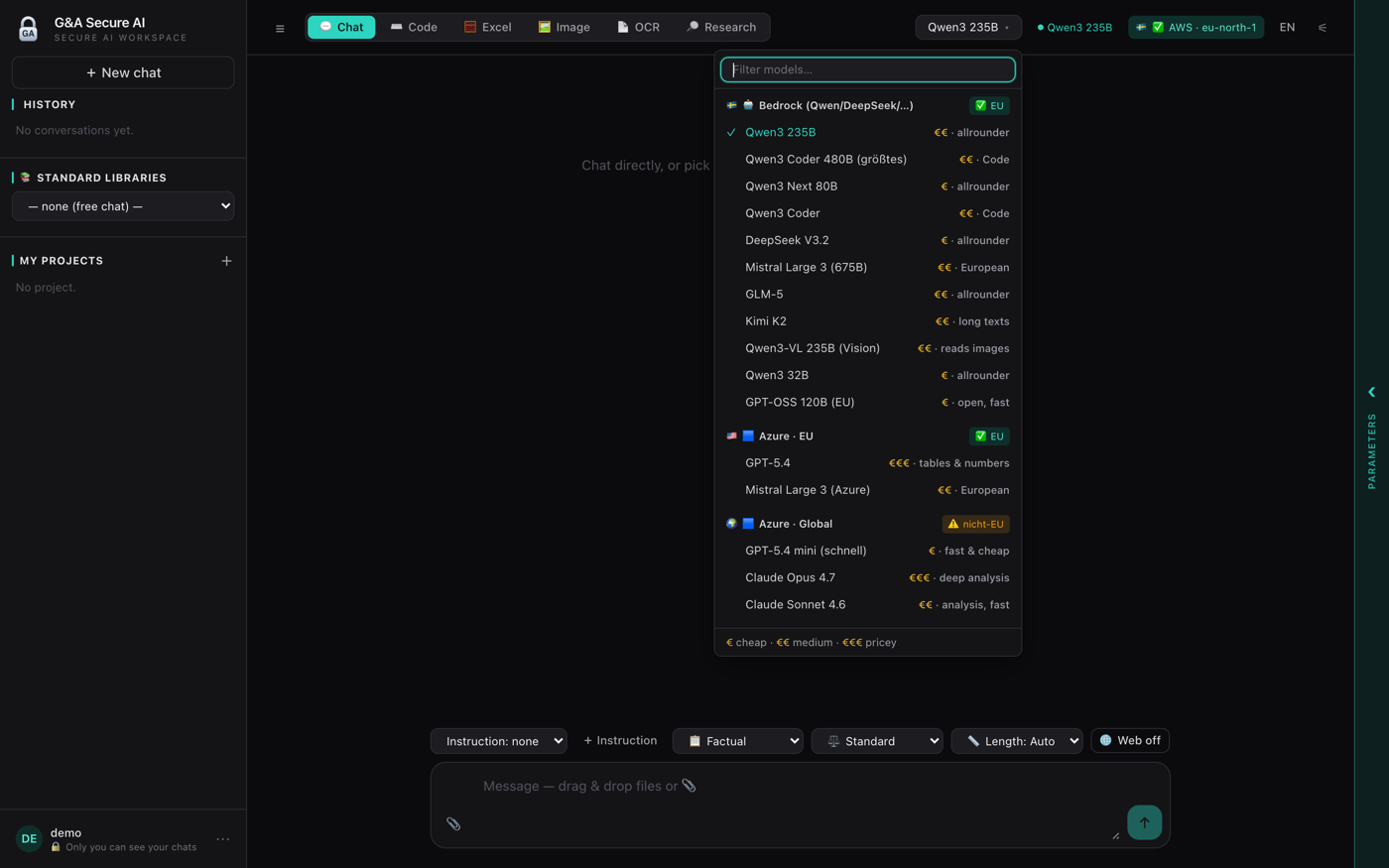
Your own AI workspace — powerful models and a cited knowledge base, without handing your data to anyone.
G&A Secure AI is a self-hosted chat and knowledge workspace — like a private Open WebUI, but without Docker and fully provider-agnostic. Every project is its own knowledge library and vector index; the chat is scoped to the active project and answers with [Q#] citations back to the source. Embeddings run locally, so the retrieval and compliance core stays in-house — and you choose, per model, whether it runs locally, in an EU data zone (AWS Bedrock / Azure EU) or globally.
The workspace
- Project = knowledge base — each project has its own sources and vector index; the chat is filtered to it and cites [Q#].
- Grounded answers (RAG) — responses are built from your retrieved documents, not free-form guessing.
- Standard libraries — pre-built norm knowledge bases (ISO, ISCC, Verra…) as read-only shared projects.
- More than chat — Chat, Code, Excel, Image, OCR and Research modes in one place.
- Local embeddings — the retrieval core runs on your hardware; your sources never have to leave.
- No Docker, no external DB — file-based; deploys on the same stack as your other tools.
Private, EU-ready & finished
- Ready today — a finished product, in use. We set it up for you, and you can see it live in a demo.
- Choose your model & region — AWS Bedrock, Azure (EU) or local Ollama, with an EU / non-EU badge on every model.
- Your data stays yours — sources, indexes and chats stay under your control; only you can see your chats.
- Provider-agnostic — swap models per task (allrounder, code, long texts, vision) without lock-in.
- Multilingual — English and Deutsch, switchable.
- Tailored per company — your projects, your libraries, your model and data-residency policy.
Status: Private — self-hosted, ready today, available to view on request
G&A Crew
Your virtual staff — named, self-hosted AI colleagues that draft, while you approve
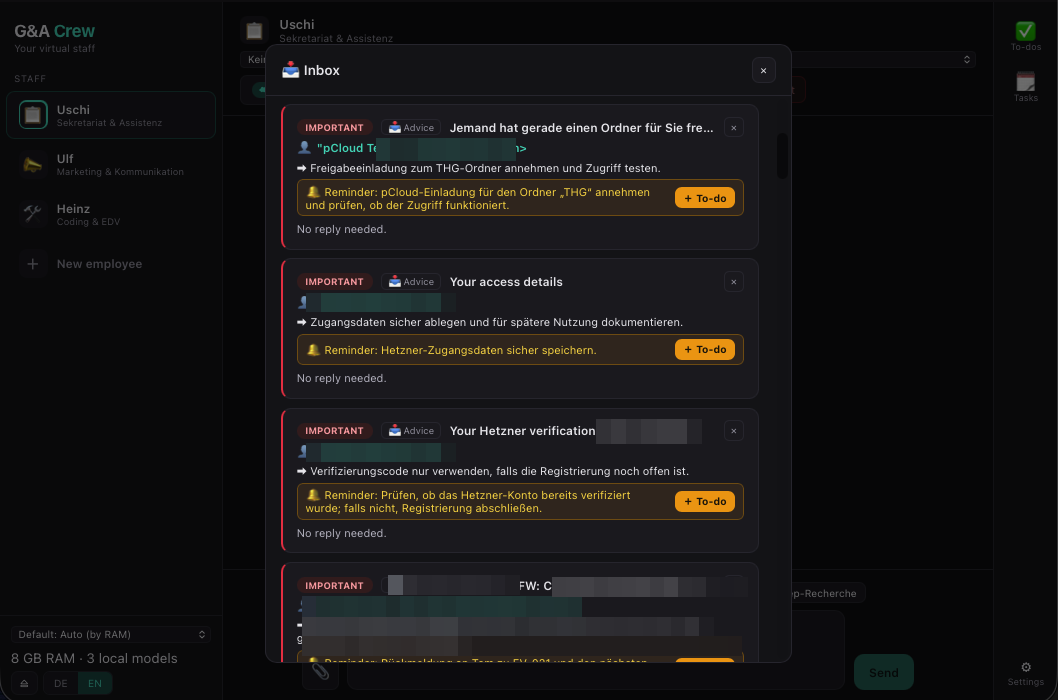
A team of named AI colleagues — running on your own hardware, always with you in the loop.
G&A Crew gives you a self-hosted staff of named AI employees, each a role with its own persona, local model and knowledge base — Uschi on secretariat & assistance, Ulf on marketing & communication, Heinz on coding & IT, plus any role you add. It runs locally on Ollama (cloud only for special tasks), triages your inbox, drafts replies, coordinates appointments and calendar entries, keeps tasks and to-dos, and exports to Word / PDF / Excel. Always human-in-the-loop: the AI drafts, you approve and send.
Your virtual staff
- Named roles — Uschi (secretariat), Ulf (marketing), Heinz (coding/IT), plus any colleague you add — each with its own persona and local model.
- Project-scoped knowledge (RAG) — every project is its own cited knowledge base, so answers stay grounded.
- Inbox triage — flags important mail and drafts replies with an adjustable tone.
- Appointments & calendar — reads meeting requests, proposes slots, and adds approved entries to your calendar.
- Tasks & to-dos — a running list per colleague so nothing piles up.
- One-click export & quick actions — Word, PDF, Excel; plus Korrektur, Protokoll, Antwort, Recherche and Deep-Recherche.
Local-first & private
- Runs on your hardware — local Ollama models (the demo machine runs 13 local models on 52 GB RAM); cloud only when you choose it.
- Human-in-the-loop — nothing is sent on its own; every draft is yours to approve, edit or reject.
- Provider-agnostic — swap the model per role, local or cloud.
- Bilingual — English and Deutsch, switchable.
- Your data stays yours — knowledge, inbox and drafts are processed locally; nothing leaves without you.
- Flagship in active development — offered to clients on request, for evaluation or a tailored deployment.
Shaped around your company
No two teams need the same crew. Which roles you run, each colleague’s persona and tone, the knowledge they draw on, the model behind them and what they are allowed to do — all of it is configured to your business and trained on your own documents, templates and house style.
- ›Pick the roles you need — secretariat, marketing, coding/IT, compliance, finance, sales, and more.
- ›Trained on your documents, templates and terminology; grounded per project.
- ›Connected to your tools and deployed on your own hardware or private cloud.
- ›Per-role permissions — who may only draft, and who may actually send.
Where the roles are heading
In active developmentG&A Crew is still growing — the roles are being built out step by step. On the near roadmap:
- ›Appointment & calendar coordination — find free slots, book meetings and send invites, with your approval.
- ›Connect to your systems — mail, calendar, document management, CRM / ERP and shared drives.
- ›Multi-step routines — research → draft → file → follow-up, with checkpoints you confirm.
- ›Colleague hand-offs — Uschi drafts, Ulf polishes the tone, Heinz handles the technical part.
- ›Recurring digests & reports — a morning briefing, a weekly summary, smart reminders.
- ›Full audit trail — every action logged; nothing leaves without a human release.
Status: Private — self-hosted, provided on client request
FeedstockTrace
RED III / ISCC-EU / EUDR traceability for waste & residue collection — from the photo at the collection point to the audit export
Field-to-audit traceability for waste & residue collection — with an AI compliance advisor.
A purpose-built platform for any company collecting waste & residue feedstocks — used cooking oil, animal fats, agricultural and forestry residues and other RED-listed wastes — under RED III, ISCC-EU and EUDR. Dispatchers plan tours on a map with real road distances; drivers record each pickup in the truck — photo, signature, GPS and a self-declaration snapshot — from an offline-capable mobile app. The system computes transport etd per leg, closes the mass balance per ISCC EU 203, and produces one-click ISCC audit Excel plus EUDR-ready UDB exports. A RAG-based AI advisor, grounded in the actual EU regulations, answers compliance questions with cited sources.
Six core modules
- Tour planning — map-based auto-sequencing with auditor-accepted road distances via Google Routes.
- Driver app (PWA) — mobile-first and offline-ready; photo, signature and GPS per pickup, syncs when back online.
- Collection points — master data, existence-proof photos with EXIF GPS, self-declaration workflow and blocklist review cycle.
- GHG calculation — Method 1, Method 2 and disaggregated default value, automatic per tour and per pickup.
- Mass balance — ISCC EU 203-compliant pool, tank and sustainability-declaration issuance.
- Audit & UDB export — one-click ISCC audit Excel plus EUDR-ready UDB CSVs.
Audit evidence & AI advisor Beta
- Five pieces of evidence per pickup — quantity, container photo, GPS coordinates, handover signature and a valid-SD snapshot (ISCC EU 203 §4.2).
- Collection Evidence Report — one auditor-ready page per pickup with an 8-point completeness check, exportable to PDF.
- Land-use evidence frozen on every sustainability declaration (ISCC Principle 1).
- AI Compliance Advisor — RAG-grounded in RED III, ISCC EU 203/205 and IR 2022/996, with source-cited answers.
- Trilingual — English, Deutsch and 中文, switchable per user.
- Built by ISCC insiders. Designed by former ISCC integrity assessors — not generic compliance SaaS. Pilot / demo release; not a substitute for certified audit.
Domain: feedstocktrace.com
Transport etd Calculator + AI Advisor
ISCC EU / RED III — Transport & Distribution Emissions, with a built-in AI advisor.
ISCC EU / RED III — Transport & Distribution Emissions, with a built-in AI advisor.
A single-purpose calculator for the transport and distribution stage of biofuel and bioliquid certification. It computes per-leg etd using the five recognised methods (M1–M5), tracks the factor-governance status of each input (default, measured, verified, manual), and generates an audit-ready evidence trail in CSV or JSON format. A scoped AI advisor sits next to the calculator and answers questions only inside the transport sections of ISCC EU 203 / 205, RED II/III, and IR 2022/996.
Calculator engine
- Method M1 — actual measured fuel consumption per leg.
- Method M2 — verified provider-specific factor with documented basis.
- Method M3 — IR 2022/996 Annex IX default efficiencies and fuel emission factors.
- Method M4 — country-specific grid electricity factor with HV / MV / LV voltage levels.
- Method M5 — RED II/III disaggregated default values for transport.
- Optional depot & filling-station distribution add-on.
- Per-leg factor governance: every input is tagged as default / measured / verified / manual and validated against scheme readiness rules.
- Full calculation trace per leg plus CSV / JSON export for audit packs.
AI advisor Beta
- Strict scope: ISCC EU 203 / 205 transport sections, RED II/III transport-related provisions, IR 2022/996 Annex IX (efficiencies, fuel EF, grid EF).
- Retrieval-augmented: grounded in indexed regulatory text rather than free-form generation, with citations.
- Polite refusals for out-of-scope topics (full-chain GHG, GHG saving %, RED pass/fail, RFNBO/RCF, processing/allocation, heat or electricity certification) with a pointer to the right advisory channel.
- Streamed answers (SSE) for fast feedback while typing follow-up questions.
- Per-session and per-IP rate limits to prevent abuse.
- Advisory only. Not a substitute for certified audit, scheme verification, or legal advice. Glatow & Associates accepts no liability for AI-generated responses.
GHG Inventory
Corporate greenhouse gas inventory under the GHG Protocol and ISO 14064-1 — co-issued with TVA — Technical Verification Alliance
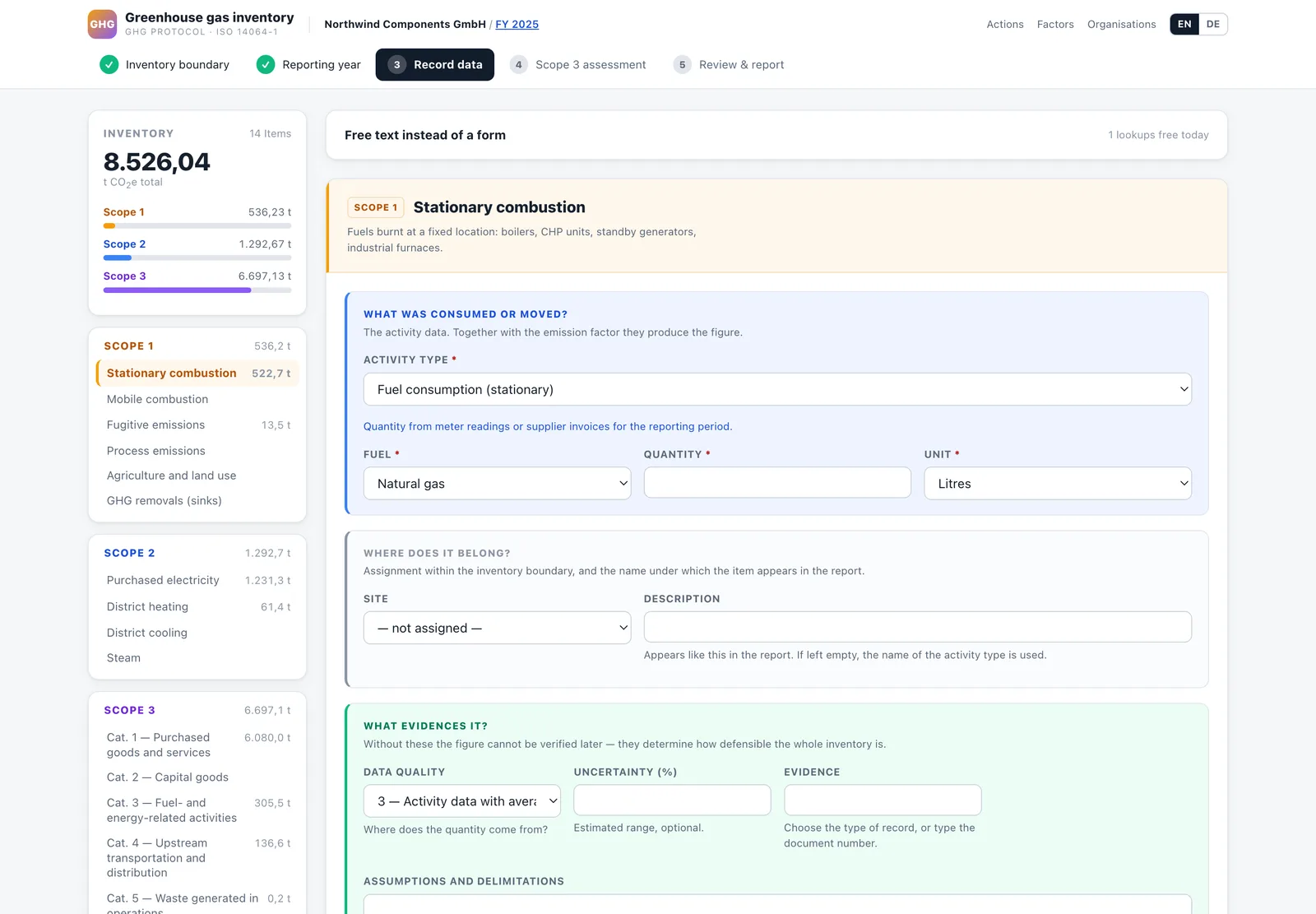
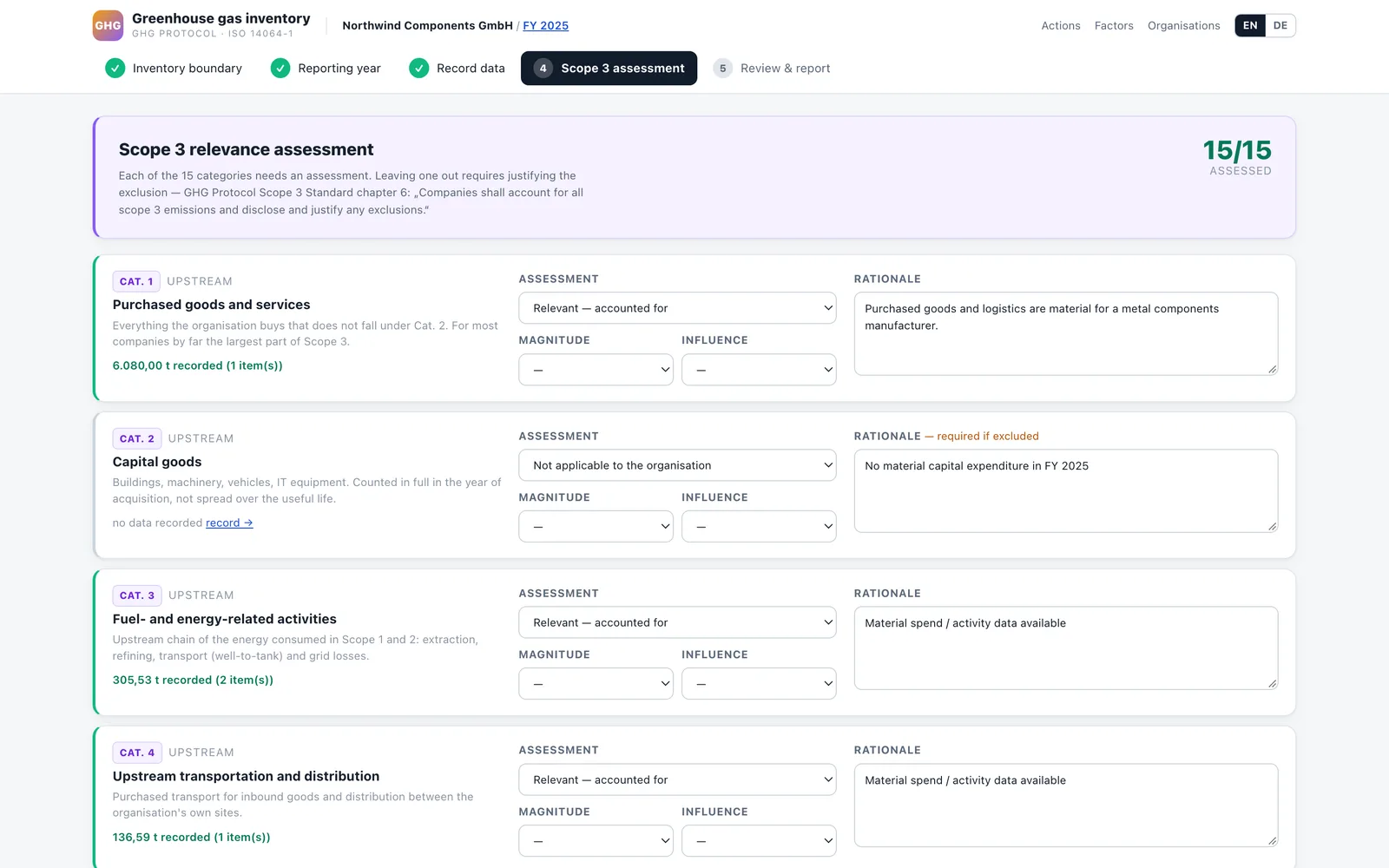
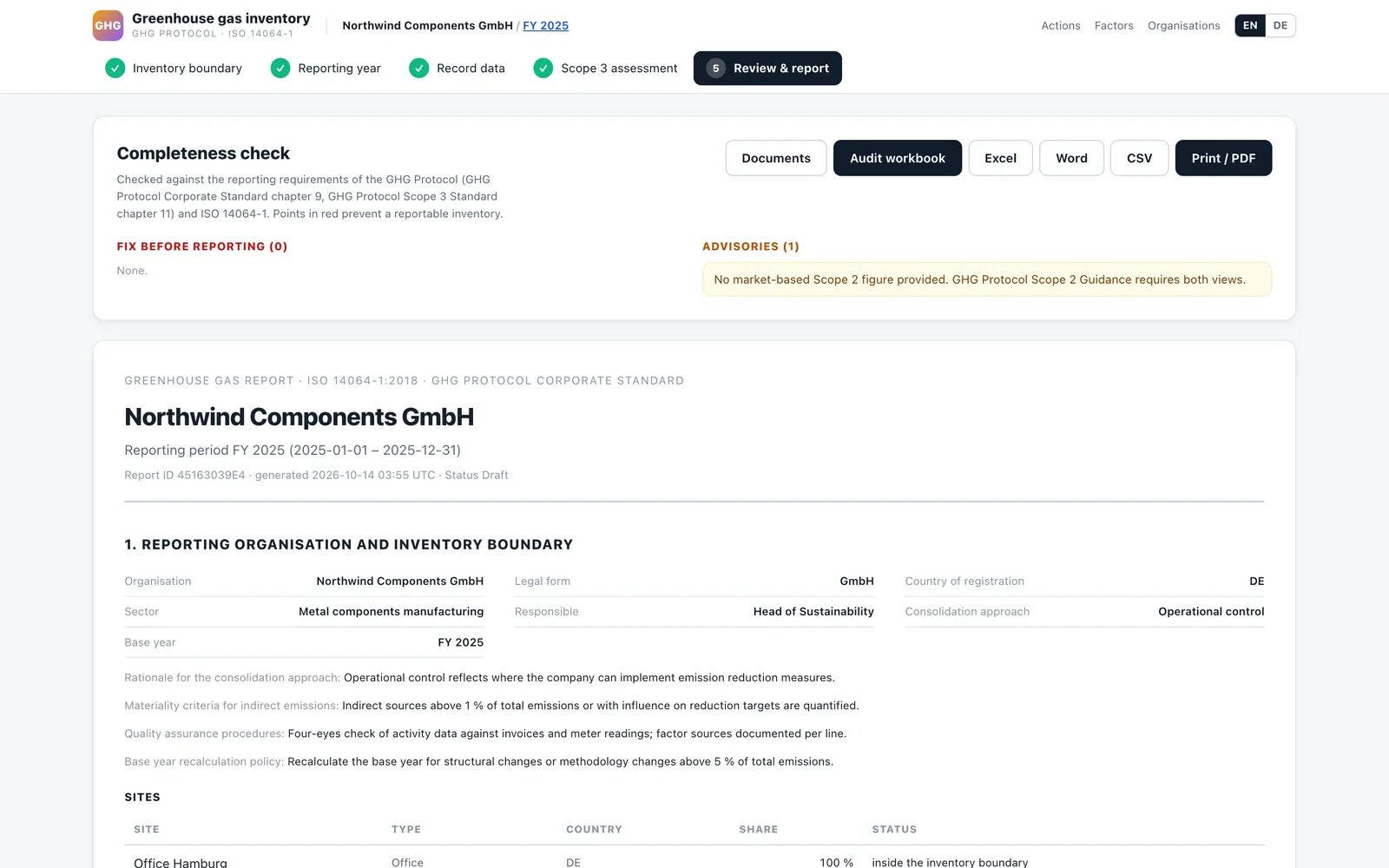
From the inventory boundary to a report a verifier can follow — in five steps.
The app follows the workflow of the standards: set the organisational boundary and consolidation approach, define the reporting year and base year, record activity data per site with evidence and data quality, assess all 15 Scope 3 categories, and close with a completeness check against the reporting requirements of the GHG Protocol and ISO 14064-1. Every figure keeps its factor, source, year and region.
What it covers
- Scope 1 — stationary and mobile combustion, refrigerants and other fugitive gases, process emissions for cement, lime, glass, ammonia and steel (IPCC 2006, NGER).
- Scope 2 — location-based and market-based, side by side as the Scope 2 Guidance requires.
- Scope 3 — all 15 categories — supplier-specific PCFs, spend-based (USEEIO), distance-based travel and freight; well-to-tank of fuels derived automatically.
- Factor library — DEFRA 2025, UBA 2025 (German grid), NGA/NGER (Australia), Singapore, IPCC 2006/2019, AR6 GWP100 — own factors only with a source reference.
- Removals and biogenic CO2 — reported separately, never netted against emissions (ISO 14064-1, 9.3.1).
Audit trail & outputs
- Completeness check — blockers and advisories against the GHG Protocol and ISO 14064-1 before anything is reported.
- Two views — GHG Protocol scopes and ISO 14064-1 categories 1–6, plus a gas-by-gas breakdown and intensity metrics.
- Evidence per line — documents, data quality and uncertainty (IPCC Vol. 1 Eq. 3.1); a change journal and locked reporting periods.
- Outputs — Word report, Excel, CSV, an audit workbook with live formulas and an evidence package for the verifier.
- Free text instead of a form — describe an activity in plain language, the AI proposes the entry, you confirm it.
Subdomain: ef.ga-advice.com
CAB-Manager
ISO/IEC 17029 & ISO 14065 administration suite for certification & conformity-assessment bodies (CBs / CABs)
Beta · In Development Currently in private beta — actively being tested and expanded. Module coverage grows with each release, and the framework is built to be extended to any further standard, scheme or regulatory programme a certification or conformity-assessment body works under.
The accreditation process of a validation & verification body — in one place, with impartiality enforced.
A back-office suite that maps the full ISO/IEC 17029 process — from pre-engagement and AI-assisted acceptance review, through automatic quotation, planning, execution and document evaluation, to the review, decision and issuance of the validation/verification statement. The phase-gates enforce the standard’s rules: a case cannot pass review or decision if the reviewer or decision-maker was involved in the execution (9.6.2 / 9.7.1.2). ISO 14065 / ISO 14064, ISO/IEC 17065 and ISO 14066 are already modelled on top of the shared core.
The 17029 process, gated
- Pre-engagement & intake (9.2) — minimum-information questionnaire with an AI/heuristic acceptability pre-check and accept/decline proposal.
- Engagement & offers (9.3) — automatic quotation from the questionnaire plus programme/standard templates.
- Planning & execution (9.4–9.5) — team assignment, V/V plan, findings and AI evaluation of incoming documents.
- Review, decision & issuance (9.6–9.7) — enforced separation of reviewer / decision-maker from the execution team.
- Impartiality, competence & programmes (5.3 / 7 / 8) — live risk register and personnel-separation checks across all cases.
- Records, appeals & management system (9.9–9.11 / 11) — audit trail, appeals/complaints, management review, internal audits, corrective actions.
AI, extensibility & audience
- Provider-independent AI — DeepSeek / OpenAI-compatible or Anthropic Claude, with a rule-based heuristic fallback that runs with no API key. Intake extraction, document evaluation, a case advisor, and drafting of 15 correspondence types.
- Extensible by design — programmes carry a standard reference; the framework can be extended to further standards, schemes and regulatory programmes on request.
- Built for CBs & CABs — certification bodies and conformity-assessment / validation-verification bodies that want their accreditation process and impartiality controls in one place.
- Trilingual — English, Deutsch and 中文, switchable per user.
- Private & release-controlled — correspondence is sent only after human release; outgoing email is optional.
- Beta — not a substitute for the standard text or accreditation advice. Built on the structure of DIN EN ISO/IEC 17029:2020.
Status: Private beta — public release in preparation
Earthdude AI
Satellite land-use analysis — deforestation, protected areas and land-use change against the EUDR cut-off, per plot
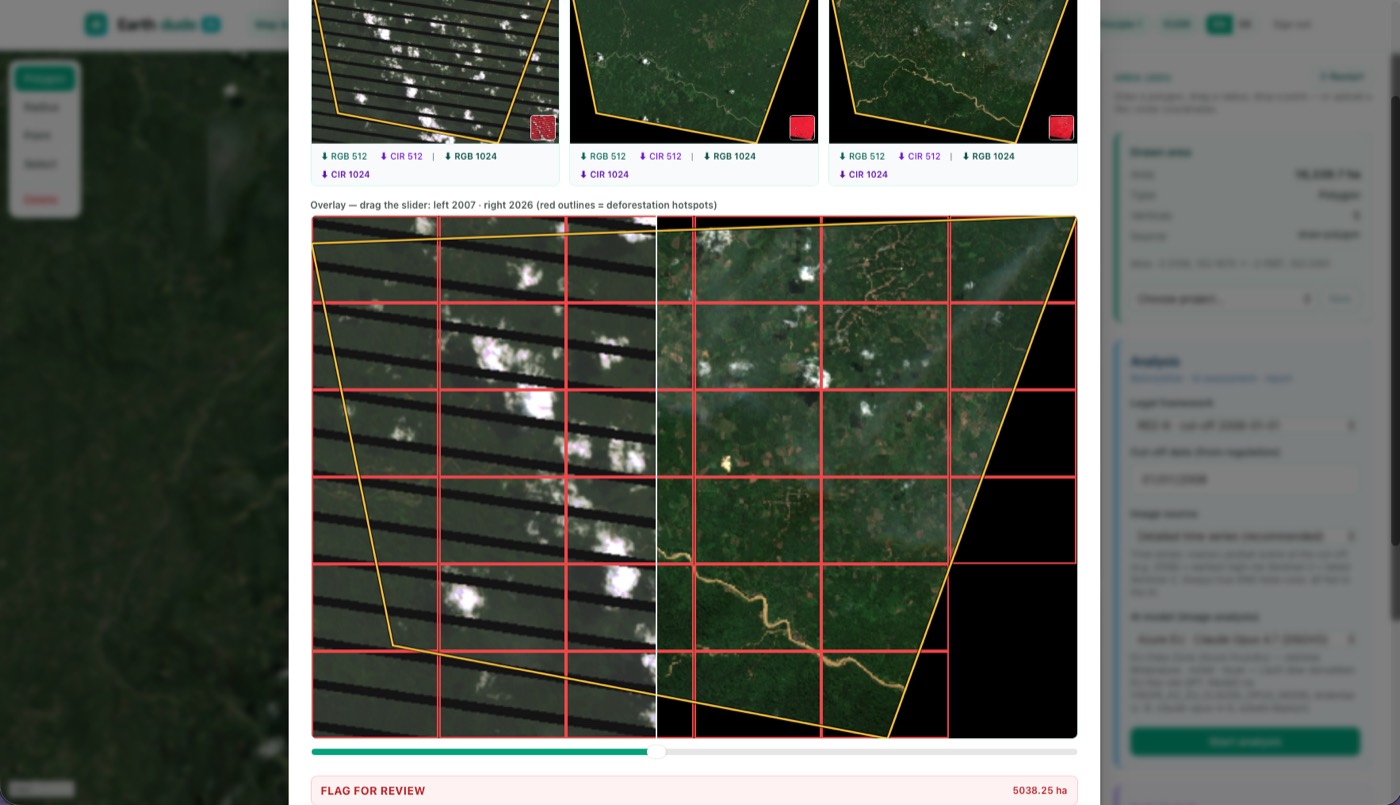
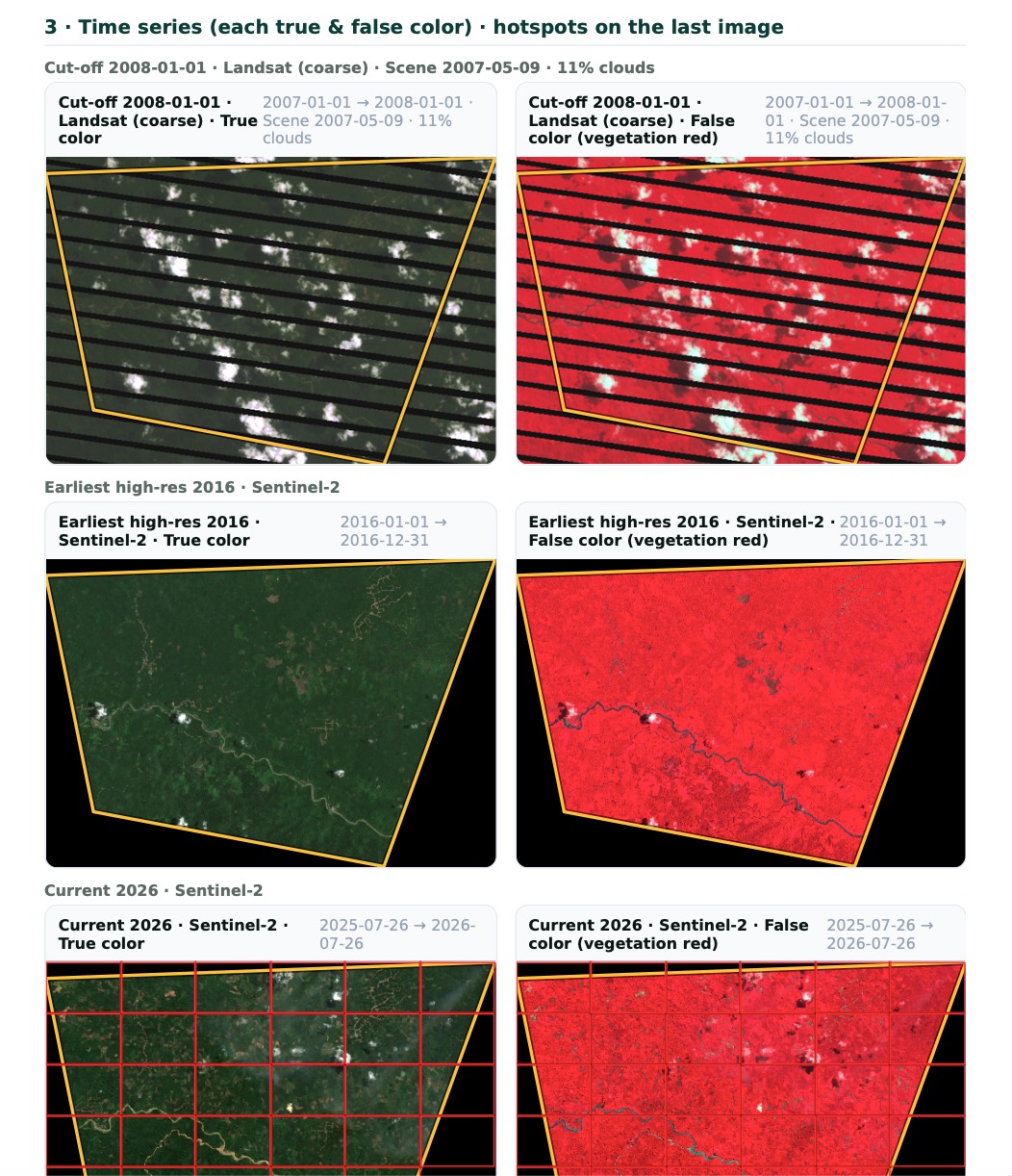
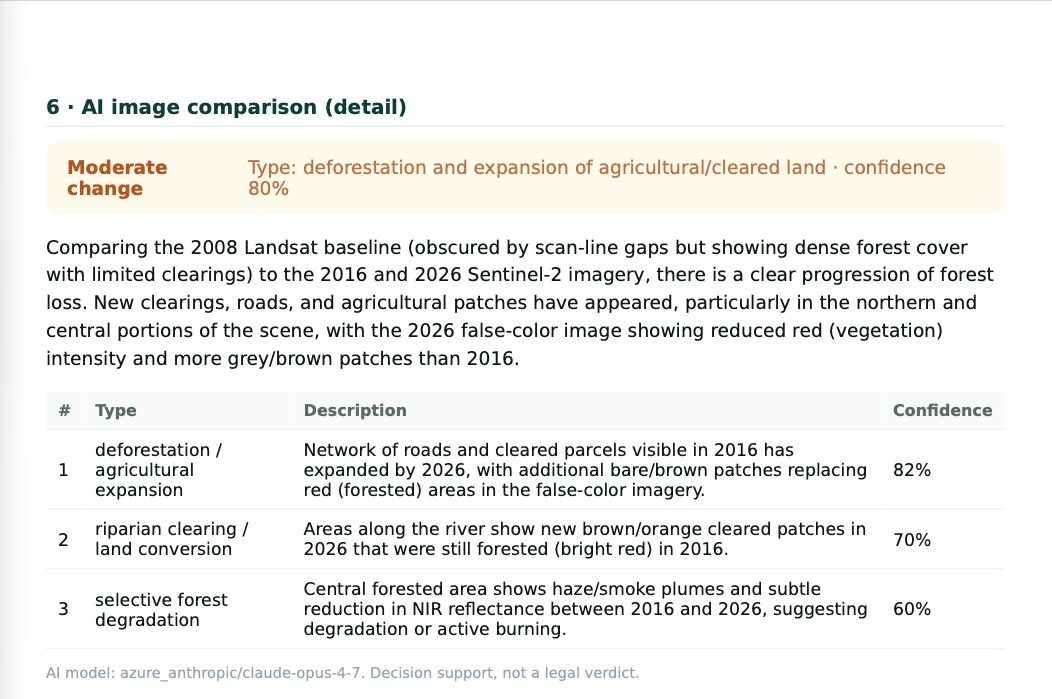
Prove a plot’s land-use history from space — deforestation-free under EUDR and ISCC Principle 1.
Earthdude AI turns a plot geometry into a due-diligence-grade land-use analysis. It cross-checks deforestation and forest degradation against the 31 December 2020 EUDR cut-off, flags protected-area overlaps, and builds an auditable land-use-change verdict from independent satellite sources — the evidence an ISCC Principle 1 or EUDR audit asks for. A built-in GHG calculator and a project workspace round it out.
What it analyses
- Plot geometry — GeoJSON / KML / shapefile / WKT upload.
- Deforestation & degradation — annual tree-cover loss against the 2020 cut-off.
- Protected areas — WDPA overlap with an IUCN-category check.
- Land cover & vegetation — an independent land-cover class plus an NDVI / EVI time series.
- Primary-forest flag — primary humid-tropical-forest mosaic.
Evidence & workspace
- Two independent engines — an own Google Earth Engine pipeline plus JRC / ESA reference layers, so every verdict is cross-checked.
- Auditable verdict — never auto-“compliant”; it flags for review with the imagery and hotspots behind it.
- Report export — a due-diligence-grade land-use-change PDF per plot.
- GHG calculator & projects — a project workspace and a built-in GHG calculator.
- Trilingual — English and Deutsch, switchable.
Domain: earthdude.ga-advice.com
FeedstockTrace Biodiesel
Mass balance, GHG and PoS for biodiesel (FAME) plants — from the incoming declaration to the outgoing PoS
One batch. One GHG value per input set. One PoS that can no longer be changed.
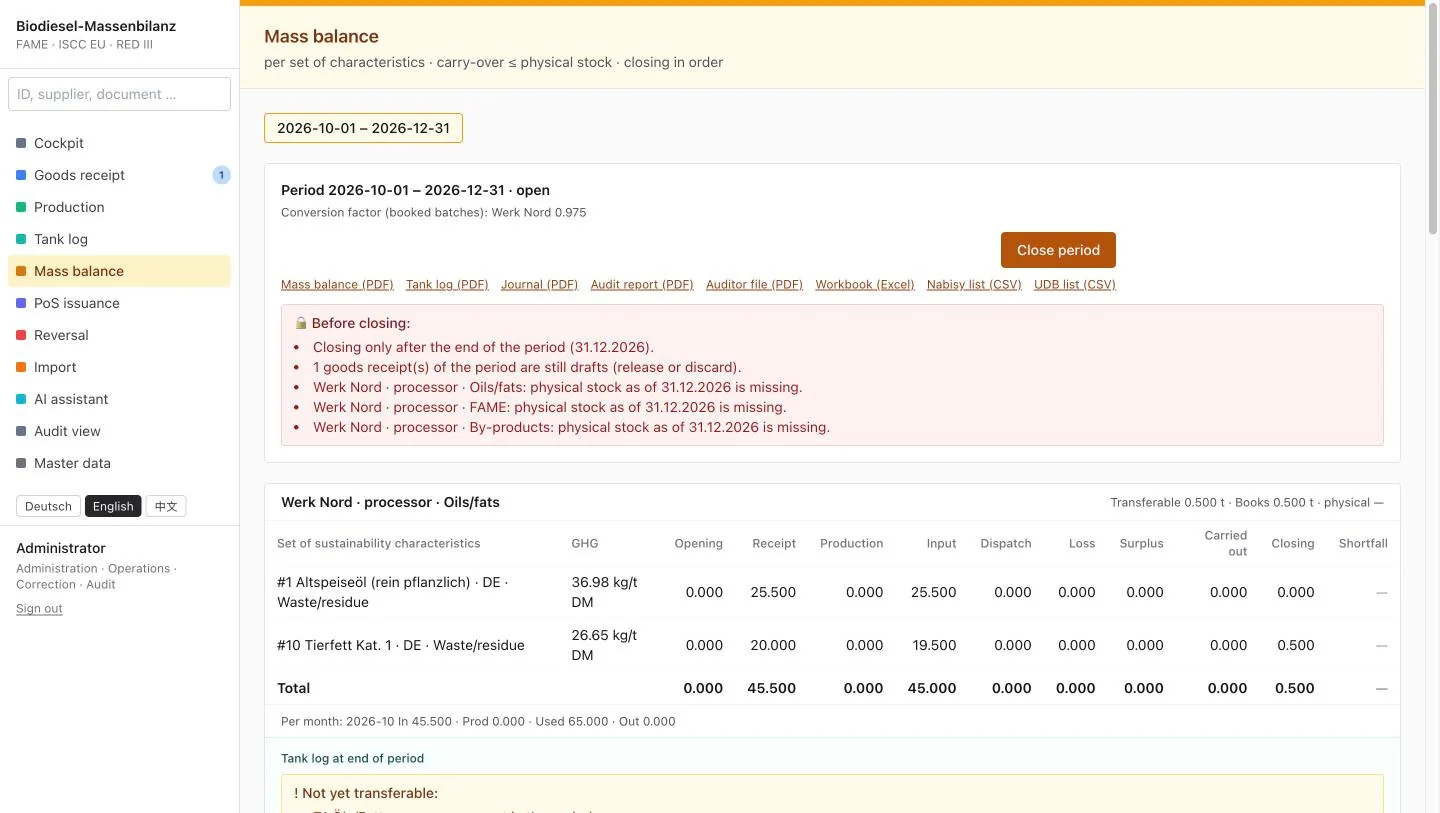
FeedstockTrace Biodiesel is a standalone tool for FAME plants. It books every delivery, batch and Proof of Sustainability per set of sustainability characteristics, calculates GHG per ISCC EU 205 / RED III Annex V with its own feedstock factor per set, keeps the mass balance per ISCC EU 203 and produces printouts an auditor can follow line by line. Plants that also collect feedstock can combine it with FeedstockTrace.
What it covers
- Goods receipt — declaration, supplier certificate checked on the delivery date, transport to the plant per IR (EU) 2022/996.
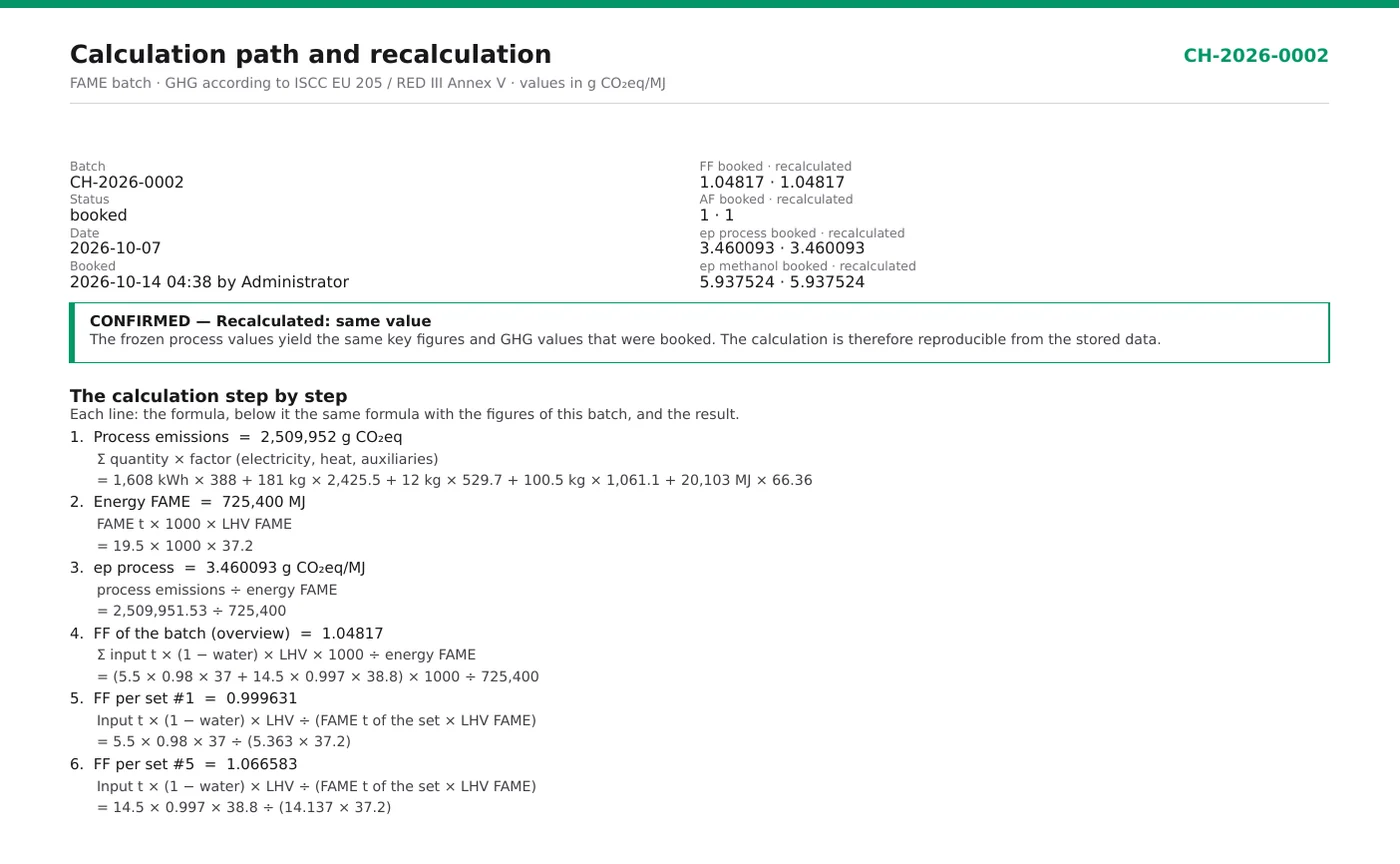
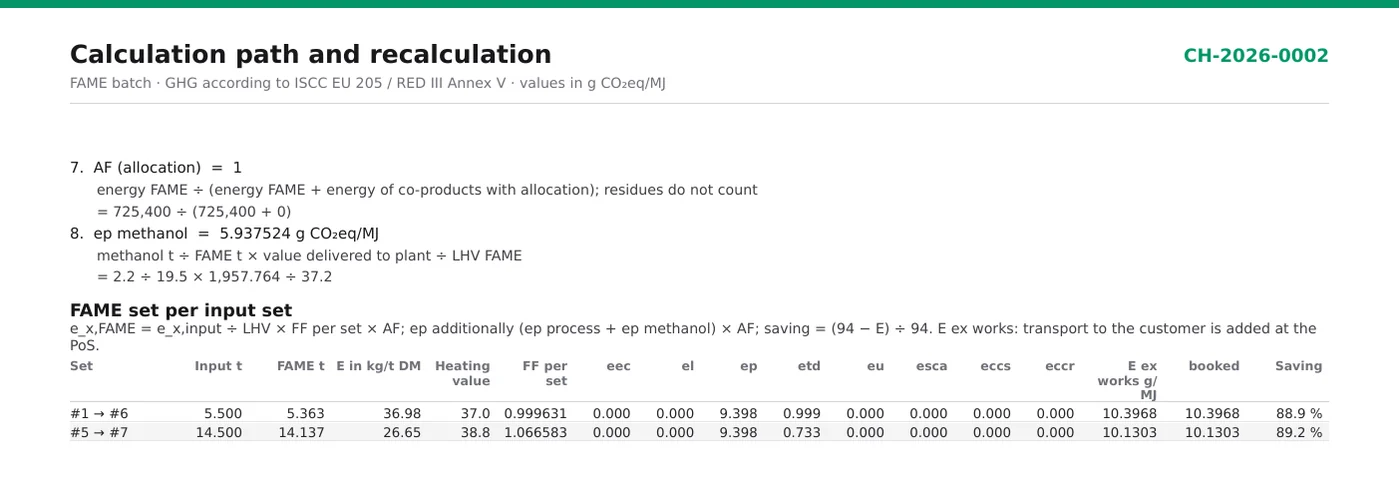
- Batch & GHG — process values per batch, feedstock factor per input set, methanol valued per lot — never averaged.
- Mass balance — per set of characteristics, periods without gaps, carry-over only up to the physical stock of each material, reconciliation B = (A + a)·CF + b.
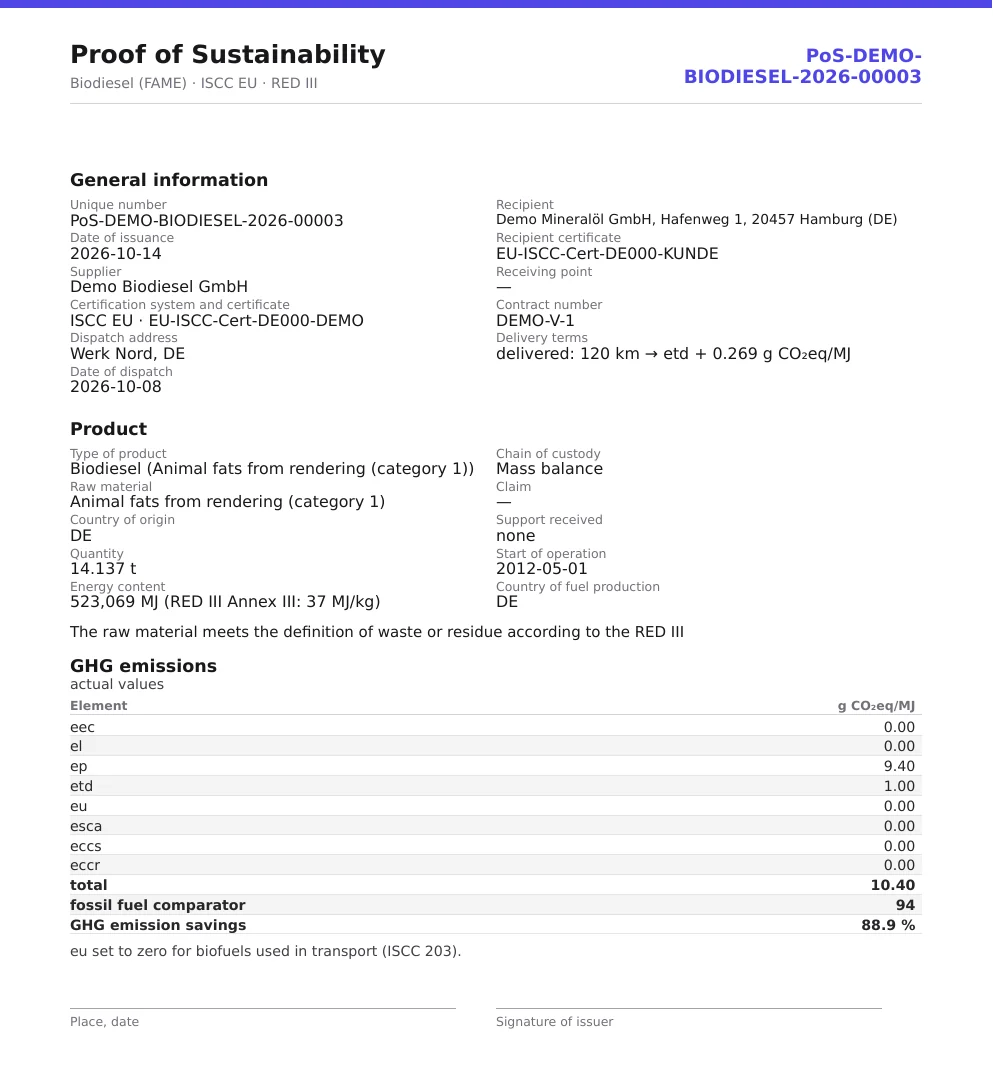
- Proof of Sustainability — one PoS per FAME set from the delivery date, with transport to the customer, energy content per RED III Annex III and the saving against 94 g CO₂eq/MJ.
- By-products — sets and PoS of their own — as residue or as co-product with allocated emissions.
Evidence & audit
- Nothing is deleted — reversal only by counter-booking with a reason, immutable audit journal.
- Auditor view — read-only, with traceability from every PoS back to goods receipt and certificate.
- Calculation path — PDF and Excel with live formulas for every batch.
- Verified core — tested against an independent verification workbook; Excel exports recalculated without stored values.
- Exports & languages — Nabisy and UDB lists; English, Deutsch and 中文.
Product page: site.feedstocktrace.com/biodiesel
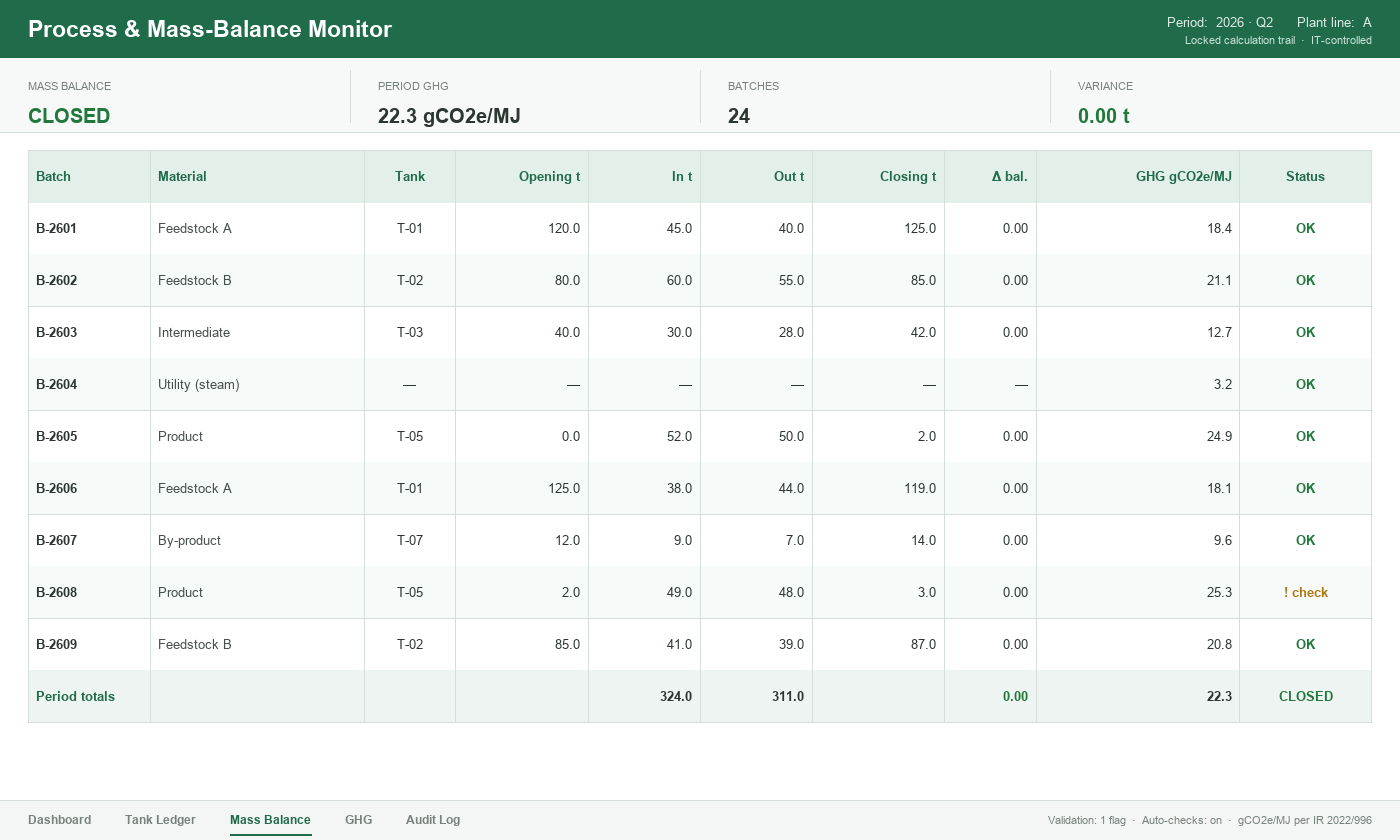
For fuel & chemical producers
GHG & supply-chain monitoring, built for your process
We develop GHG (THG) and supply-chain monitoring tools for fuel and chemical producers — covering the production process itself and every material inflow and outflow. Real-time mass balance, per-batch GHG, feedstock-to-product traceability and in/out reconciliation, audit-ready — with AI integration built in.
- Production process, end to end — inputs, utilities, tanks, batches
- Material in & out, reconciled — a mass balance that closes
- Per-batch GHG & savings — RED / REDcert-aligned
- Supply-chain traceability — feedstock to product
- AI integration — extraction, checks, and a scoped advisor
The Wider Toolkit
More tools — available on client request.
Beyond the tools above, we build and run a wider set of compliance applications that are not publicly listed. We provide them to clients on request — for evaluation, or tailored and extended to a specific standard, scheme or workflow, and developed further where a mandate needs it.
Standard Document Analyzer
On RequestChecks client documents (PDF, Word, Excel) against a chosen certification scheme — grounded in a local RAG index of the actual standard text with [Q#] source citations. Fully self-hosted (Ollama). Per-requirement checklist, a skeptical verifier pass against missed gaps, and severity-rated findings.
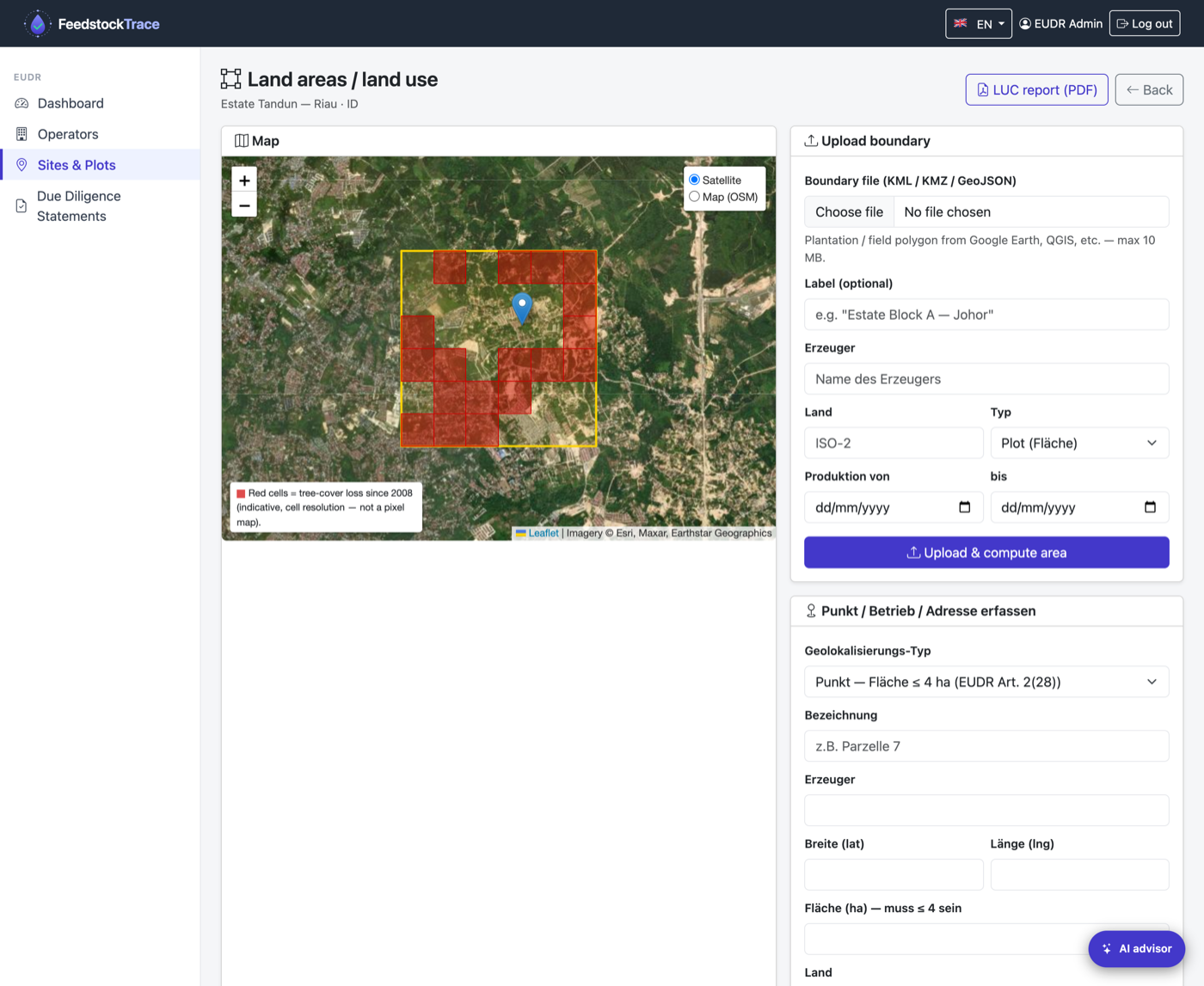
FeedstockTrace EUDR
On RequestEUDR due diligence and a submission-ready Due Diligence Statement (Annex II). Per-plot deforestation check against the 31 Dec 2020 cut-off via Global Forest Watch, automatic country benchmarking, DDS PDF plus TRACES CSV/XML export, and a RAG AI advisor grounded in the official EUDR texts. EN / DE / ZH.
Plant Process & Mass-Balance Monitor
On RequestA bespoke monitoring tool for industrial and chemical production plants — built in Excel with hardened IT controls. It follows the process end to end: feedstock, fuel and utility inputs, tank movements and batch flows, mass balance and per-batch GHG. Built-in validation, tank-ledger safeguards and a locked calculation trail keep it audit-ready for RED / REDcert and for technical oversight alike — tailored to each plant and its process. On request, the Excel model is migrated into a full IT software tool (a web app) with the same controls and audit trail.
Who Uses Our Tools
Built for the people who actually have to defend the number.
Producers & Collectors
Capture pickups and shipments, compute the emissions behind each batch, and maintain the evidence log that supports outgoing Proof of Sustainability and sustainability declarations.
Traders & Storage
Assess incoming PoS data, recompute legs where defaults are too conservative, and decide whether to switch a leg from default to actual or verified. Document every change.
Internal Audit & Readiness
Pre-audit your calculations and evidence before the certification body opens the file. Use the calculation traces and governance flags to find weak spots in evidence quality.
Sustainability Officers
Translate scheme-level requirements into a working calculation that operations teams can actually populate, line-by-line, with the evidence they have on hand.
Consultants & Auditors
Replicate or sanity-check a client's emissions and evidence trail in minutes. Compare a default-only run versus an actual-data run to quantify the headroom.
Training & Capacity Building
Walk teams through the underlying methods and evidence steps in a working environment, with the AI advisor supplying scheme references on demand. A safer learning surface than a production audit file.
How Our Tools Work
A defensible number, built one evidence step at a time.
Whatever the tool — collection traceability, transport etd, or a full Scope 1/2/3 footprint — every Glatow & Associates tool follows the same discipline: a narrow scope, a regulatory citation behind each value, an evidence reference behind each input, and an export an external auditor can actually open.
Principle 1
Scope tightly
Each tool is locked to one scheme and one step in the value chain. Narrow tools survive the audits that generic all-in-one calculators fail.
Principle 2
Ground every value in the regulation
Methods and factors trace back to the actual text — RED II/III, ISCC EU 203/205, IR 2022/996, the GHG Protocol — not to a black-box average.
Principle 3
Capture evidence at the source
A delivery note, GPS log, container photo, signature or supplier certificate is pinned to each input the moment it is recorded — the same record the auditor will later request.
Principle 4
Make every input governable
Each value carries a status — default / measured / verified, or a completeness check — so you can see at a glance whether it will hold up.
Principle 5
Export audit-ready, and ask when unsure
One-click CSV / JSON / Excel / PDF export with citations attached, plus a scoped, source-citing AI advisor that refuses to speculate outside its lane.
Scope & Honest Limits
What our tools do — and what they deliberately don't.
In scope
- ›Tightly-scoped, scheme-specific calculations — transport etd, Scope 1/2/3 footprints, waste & residue collection traceability
- ›A regulatory citation behind every value
- ›Evidence reference and source note on every input
- ›Per-line governance or completeness status
- ›Calculation trace plus CSV / JSON / Excel / PDF audit export
- ›A scoped, source-citing AI advisor inside each tool
Deliberately out of scope
- ›A substitute for a certified third-party audit or scheme verification
- ›Legal or regulatory opinions you can rely on without review
- ›Final pass/fail determinations or full-chain GHG sign-off
- ›RFNBO / RCF certification
- ›Guaranteed correctness of AI-generated answers
- ›Anything outside each tool's stated scheme scope
For these wider topics, please reach out — we cover them through the advisory practice, not the tools.
Frequently Asked
Common questions, answered honestly.
Are the tools free to use?
It varies by tool. The Transport etd Calculator is free during its current beta (request a code on the login screen). The GHG Inventory is available on request with a personal access. FeedstockTrace is offered as a 30-day pilot. We will always tell existing users before any pricing change.
Can I use a tool's output directly in my audit?
Our tools produce audit-ready evidence — calculation traces, governance flags, evidence references and exports. However, it is your responsibility, and your certification body's, to assess whether the records behind each input actually qualify under the applicable scheme. The tools document your inputs; they do not certify them.
Why are the AI features in beta?
Because we have not yet tested them across enough edge-case prompts to call them production-grade. They are grounded in indexed regulatory text and refuse out-of-scope topics, but no AI system is infallible. Treat answers as a starting point for your own reasoning or as a research aid — not as a regulatory opinion. Our advisory team remains the appropriate channel for anything that must be defensible.
What happens to the data I enter?
It depends on the tool. The Transport etd Calculator runs client-side in your browser — inputs stay local unless you export them. The GHG Inventory and FeedstockTrace process inputs server-side under the sub-processors listed in our Privacy Policy. Across all tools, the AI features send your question plus retrieved context to a model provider for inference (rate-limited); we log session metadata for security, not your underlying business data.
Why are your tools so narrowly scoped?
Because narrow tools survive audits better than wide ones. A single tool trying to cover feedstock, processing, allocation and end-use would have to assume too much per client. Narrow, single-purpose tools — transport etd, Scope 1/2/3 footprinting, collection traceability — each have well-defined methods and a clean evidence boundary, which is exactly when a tool can be both useful and defensible.
Can a tool be white-labelled or hosted on our own domain?
Possibly. Drop us a note via the contact page outlining the use case (internal teams, external clients, training, etc.). White-label arrangements are handled case by case.
I see a bug or a value that looks wrong. What do I do?
Email us with the setup that reproduces it — the inputs, factors and references involved. Our data tables are versioned and regenerated from a single master, so corrections propagate cleanly.
Open a Tool
Each tool lives on its own domain. Some open with a free tier; others need an access or pilot code you request from the login screen or directly from us.
Tool 01
FeedstockTrace
Waste & residue collection traceability — RED III / ISCC-EU / EUDR.
Pilot · 30 days →Tool 02
Transport etd Calculator
Transport & distribution emissions with a scoped AI advisor.
Beta · Login →Tool 03
GHG Inventory
GHG Protocol and ISO 14064-1 inventory, Scope 1/2/3, with a completeness check.
On request →Tool 04 · Beta
CAB-Manager
ISO/IEC 17029 / ISO 14065 administration suite for CBs & CABs.
Request access →Roadmap
More tools on the bench.
In Development
CBAM Embedded-Emissions Helper
A guided walkthrough for the CBAM declarant role: aggregating supplier data, applying default values, and producing the quarterly report skeleton.
In Development
EUDR Due-Diligence Checklist
A structured intake form covering geolocation evidence, risk assessment, and documentation completeness for in-scope commodities.
Concept
RFNBO Pathway Sketcher
A first-pass sketch tool for renewable hydrogen and downstream synthetic-fuel pathways, mapped against the RFNBO additionality and temporal-correlation rules.
Got a tool you wish existed in your daily compliance work? Tell us about it.